
If you would like to schedule lectures or events for your session that are not yet shown in the selection, you can create new ones.
Create a new lecture /event
1. Click on the Add lecture/event field. A new window will open.
2. Enter the title under the "Lecture/Event" tab.
3. Click
Saveto assign the speaker in a later stepSave and backif you wish to assign the speaker later.
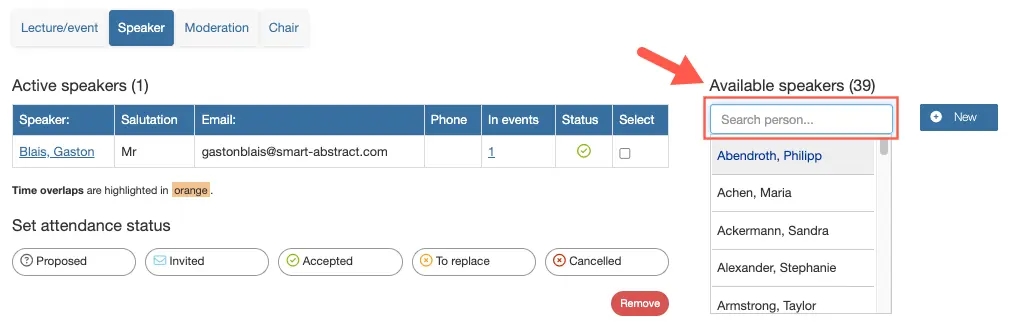
4. Assign a speaker
To assign a speaker, go to the Speaker tab and select the desired person from the list of available speakers on the right. Tick the box next to their name, then click "Assign selected speaker".
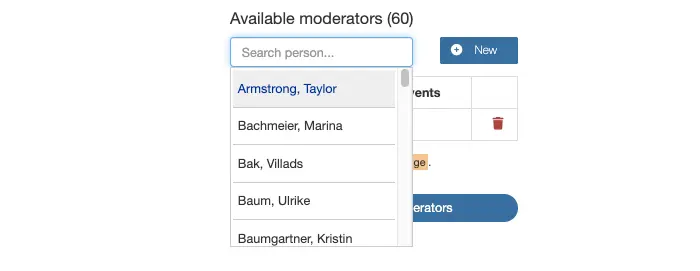
5. Assign a modarator or chairperson
To assign a modarator or chairperson, go to the relevant "Moderation" or "Chair" tab. Select the desired person from the "Available moderators" or "Available chairpersons" list by ticking the box next to their name. Then click Assign selected moderator or Assign selected chairperson.
Optional: add an abstract
If the selected person has submitted an abstract, you can now link it to the presentation.
Optional: Create a new speaker
If the person you are looking for is not yet in the system, you can create a new entry for them.
Please note: When you click "Save and Close" for a lecture or event, it will be added directly below the last scheduled item in the timetable.
If there is insufficient time in the session for automatic insertion, the presentation/event will be added to the "Unscheduled presentations/events" section. You can then add it to the timetable at a later time.
Planning sessions
For information on planning oral or poster sessions, please see below: